GT Auto Clicker Review: Is It Safe, Legit, & Reliable?
Auto clickers have become increasingly popular among users who want to simplify repetitive tasks. From gamers automating frequent clicks to professionals managing routine workflows, these tools help you save time and reduce manual effort.
However, one major concern is that many users are not sure whether these applications are actually safe to use or if they contain any malware or viruses.
Among these various automation tools, GT Auto Clicker has gained significant popularity. But an important question still remains: Is it safe, legitimate, and reliable enough for long-term use?
In this review article, we’ll evaluate the software’s safety, features, performance, and overall reliability to help you determine whether GT Auto Clicker is a trustworthy option or not.
What is GT Auto Clicker?
GT Auto Clicker is a free automation tool that helps you automate repetitive mouse-clicking tasks on Windows computers. It allows you to perform automatic clicks at predefined intervals and specific screen locations.
Because of its simple interface and lightweight design, it is a great choice for beginners who need a straightforward tool without dealing with complex scripting or advanced configurations.
It is commonly used for automating repeated gaming activities, filling out forms, data entry, software testing, refreshing web pages, and reducing physical strain during long clicking sessions.
Why are users concerned about Auto Clicker Safety?
Before downloading any auto-clicking software online, many users naturally become cautious, and that’s for good reason. As a result, they usually compare popular tools like OP Auto Clicker, GS Auto Clicker, and GT Auto Clicker before deciding which one to use.
Since online reviews are often mixed, users often feel uncertain about a software’s authenticity and overall safety. In such cases, they are left with only two safe options: downloading these tools from the official website or trusted platforms like the Microsoft Store.
Otherwise, users may face the following common security concerns.
Malware Infections
Unofficial mirrors sometimes distribute modified installers that contain malicious code, spyware, or unwanted bundled programs. Installing such files can put both personal data and the system at risk.
Fake Download Websites
Popular software applications often attract fake websites that closely resemble official sources. These websites may host harmful versions or redirect users to completely unrelated downloads.
Cracked Software Versions
Several third-party websites provide cracked or repackaged versions of the software that may appear identical to the original version but carry hidden security risks.
Antivirus Warnings
Some antivirus programs occasionally flag automation tools as threats because of their automated input behavior. This often leaves users wondering whether the warning is genuine or simply a false positive.
Is GT Auto Clicker Safe to Download?
The safety of any software mainly depends on the source from which the installer file is downloaded. In the case of GT Auto Clicker, it is completely safe to download as long as you get it from a trusted or verified source.
Usually, problems arise when users download installers from unofficial websites, mirror sites, or third-party sources. Here are some factors that can help determine the safety of any application before downloading it.
Download Only From Trusted Sources
The safest option is to only download installer files from the official developer website rather than relying on third-party platforms. These official sources not only reduce the risk of tampered installation files but also give you confidence that the software is safe to install and use on your system.
To stay on the safe side, you can use these sources:
- Microsoft Store
- Official Website: https://gtautoclicker.org/
Avoid Unofficial Mirrors
Mirror websites sometimes host outdated files that may contain security vulnerabilities. Sometimes they can also provide altered files that include bundled programs, malicious content, or excessive pop-ups.
Scan Installation Files
Even if you have downloaded the software from a trusted source, it is always a good practice to scan the installation files before running them. Some popular antivirus programs you can use are Windows Defender or Malwarebytes.
Is GT Auto Clicker Legitimate and Safe to Use?

In short, software legitimacy and safety are two different things.
Just because software is safe to install does not automatically mean it is trustworthy or backed by a credible developer. Fortunately, GT Auto Clicker shows several signs of being a legitimate and trustworthy application.
Pro Tip:- If security is very important to you, it’s better to also read the software’s terms of service and official policies instead of relying only on third-party platforms.
Here are some key indicators that help support its legitimacy.
Established Reputation in Software Communities
A strong indicator of software legitimacy is its reputation among regular users, and GT Auto Clicker has been discussed across multiple forums, gaming communities, and automation-related platforms over the years. This suggests that this software has built a strong reputation and earned the trust of its community.
External Reviews and Discussions
Apart from community discussions, users should also read reviews published by reputable review websites and tech blogs such as Hongkiat and MakeUseOf. Unlike general user discussions on Reddit, professional reviews often evaluate safety, software behavior, and overall reliability in greater technical detail.
User Adoption History
Applications that have been actively used for years often serve as a strong indicator of legitimacy. Over time, GT Auto Clicker has continued to be widely used for gaming tasks, repetitive office work, and various productivity-related activities.
This long-term usage history has helped establish it as a trusted option among users.
Responsible Usage and Platform Policies
While GT Auto Clicker itself is a legitimate tool, users should also understand that some games, websites, or online platforms may restrict automation. In addition, some multiplayer games and websites use anti-cheat systems that can detect automated activity, which may result in account bans or temporary suspensions.
For this reason, you should always review platform policies and game rules before using auto clicker programs.
Key Features
Here are some useful features that make GT Auto Clicker a reliable tool.
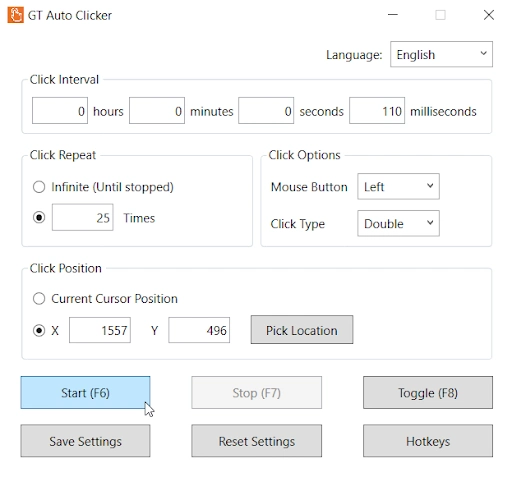
- Simple User Interface: This tool offers a beginner-friendly interface that makes customization easy, even for first-time users.
- Custom Click Interval Settings: Allows you to configure click intervals based on different automation needs and clicking patterns.
- Repeat Clicking Option: Lets you repeat automatic clicks for a specific number of times or infinitely until manually stopped.
- Mouse Buttons & Click Types: Supports single and double click options while allowing you to choose between left, right, and middle mouse buttons.
- Save & Reset Settings: This feature helps you save frequently used configurations for later use, while the reset option quickly restores all settings to default.
- Customizable Hotkeys: You can also assign custom hotkeys to quickly start or stop the auto clicking process without switching windows or interrupting the workflow.
Performance Testing and User Experience
Besides safety, it is also important to evaluate how well the software performs in terms of the installation process, resource usage, and overall user experience.
Quick Installation – Unlike other automation tools, it comes with a lightweight installer file of only 2 MB. In addition, the installation process is simple and does not require multiple setup steps.
Easy Setup Process – With GT Auto Clicker, you can easily configure click intervals, click repetition, hotkeys, and other settings within a few minutes.
Minimal CPU and RAM Usage – It consumes very minimal system resources, making it suitable for running smoothly even on older or low-end computers.
Stable Windows Performance – The software can run continuously for long hours and perform automated tasks without crashing or facing performance issues.
GT Auto Clicker Pros and Cons
Like any software, GT Auto Clicker comes with both advantages and disadvantages that should be considered before using it. It also helps you determine whether it is the right tool for your automation needs.
Pros
- Easy to set up for non-technical users
- Minimal system resource usage
- Lightweight app with a fast installation process
- Customizable click settings, screen locations, and hotkeys
- Stable for long-term use on Windows systems
- Compatible with Windows, Android, and Chromebook.
Cons
- Lacks Record and Playback functionality.
- Not designed for complex mouse movements or keyboard actions
- May conflict with anti-cheat policies in some games
- Limited customization compared to scripting tools like AutoHotkey
Conclusion
After reviewing its safety, features, and overall performance, it is clear that GT Auto Clicker is absolutely safe and a legitimate tool. However, users should always remember one important rule: download only from the trusted websites and avoid third-party mirror sites.
For anyone looking for a simple tool to automate repetitive clicks, GT Auto Clicker remains one of the safest and most trustworthy options available.