From PDF Tables to a Finished Report: Extract, Validate and Publish with iBoomto
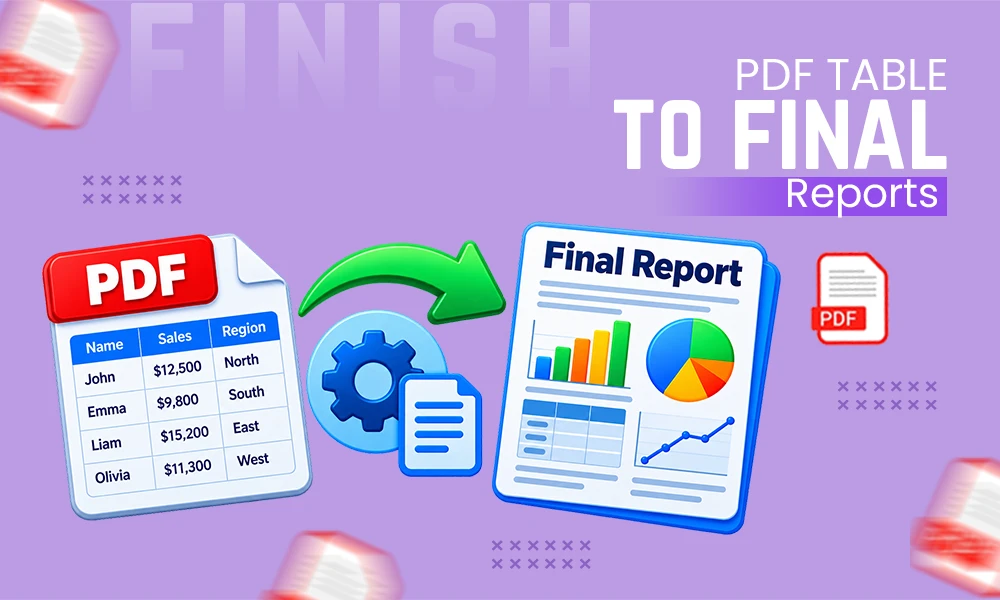
Public reports, research papers, government statistics, and industry publications often contain valuable information inside PDF tables. However, copying this information manually can take time and introduce errors. Columns may become misaligned, numbers may lose their formatting, and important details can be missed during the process.

A better workflow is to extract the data, verify the original figures, analyze the results, and organize the findings into a readable report. With iBoomto, users can explore document processing tools to simplify several stages of this workflow, from PDF table extraction to preparing a Markdown document and converting it into a finished PDF.
Why Extracting Tables from PDFs Requires Care
PDFs are designed to preserve document appearance, not always to make data easy to edit. A table may look perfectly organized on the screen but become difficult to work with when copied into a spreadsheet. Scanned documents can create additional challenges because their text may need optical character recognition (OCR) before it can be extracted.
For researchers, analysts, and business teams, these problems can affect the reliability of the final report. A misplaced decimal or incorrectly aligned value can change the meaning of a calculation. That is why extraction should always be followed by validation.
If you need to extract tables from PDF free, iBoomto offers an online PDF Table Extractor that can identify tables and export the results into formats such as Excel, CSV, and JSON. This gives users an editable starting point for organizing data instead of manually rebuilding every table.
Step 1: Collect Public Data from Reliable Sources
Before extracting anything, identify the information your report needs. Public government datasets, official statistics, research publications, and institutional reports can provide useful evidence for comparisons and analysis.
Choose sources that clearly identify their publication dates, reporting periods, units, and methodology. Download the relevant PDF files and record the original source information so that you can refer to it when writing the report.
It is also helpful to define a specific research question. For example, you might compare annual population figures, public spending, industry growth, or changes in energy production. A focused question helps you select relevant tables rather than collecting information that does not contribute to the final analysis.
Step 2: Extract Tables and Validate the Results
Once you have the source documents, use a table extraction tool to convert the information into an editable format. With iBoomto’s PDF Table Extractor, the basic process involves uploading a PDF, allowing the tool to detect its tables, reviewing the extracted results, and exporting the data.
The tool supports table extraction from text-based and scanned PDFs, although the accuracy of scanned content can depend on image quality and document structure.
After extraction, compare the output against the original document. Check column headings, row counts, dates, decimal places, units, and negative values. Pay particular attention to totals and percentages because small extraction errors can affect subsequent calculations.
Do not assume that an exported spreadsheet is automatically correct. Recalculate important totals, investigate missing values, and record any limitations in the source material. This verification stage is essential when preparing reports that other people will use to make decisions.
Step 3: Analyze the Data and Identify Useful Findings
With the data organized and checked, begin analyzing it against your research question. Spreadsheet software can help calculate totals, percentage changes, averages, and differences between reporting periods.
For example, when comparing public expenditure over several years, calculate the year-over-year change and identify periods with unusually large increases or decreases. Then return to the original reports to determine whether the figures are comparable and whether changes in definitions or reporting methods might explain the results.
Separate confirmed facts from interpretations. A rise in a particular figure does not necessarily explain why it happened. Reliable analysis describes the observed pattern and uses supporting evidence before suggesting possible explanations.
Document the calculations and retain references to the original sources. This makes it easier to reproduce the analysis and allows readers to check how the conclusions were reached.
Step 4: Use iBoomto Document AI for Windows
When research involves several documents, extracting data is only one part of the process. You may also need to summarize findings, compare information across files, draft sections, and organize the final report.
iBoomto AI is a document assistant for Windows designed to help users work with documents through natural-language instructions. Depending on the task and available features, users can ask questions about documents, extract information, summarize content, and develop structured outputs.
Its approach to document processing is relevant for teams that want to bring multiple research tasks into one workflow. The software also supports online and local AI model options, allowing users to consider different processing approaches based on their needs and configuration.
Step 5: Turn the Findings into a Markdown Report
After verifying and analyzing the data, organize the findings into a Markdown report. Markdown uses simple formatting symbols to create headings, paragraphs, lists, links, and tables without requiring a complex page-layout process.
A useful report structure includes:
- Introduction: Explain the research question and its purpose.
- Sources and methodology: Identify the public documents and explain how the data was collected.
- Results: Present the validated figures and relevant comparisons.
- Analysis: Discuss the main patterns and their possible significance.
- Limitations: Explain missing information, inconsistencies, or restrictions in the source data.
- Conclusion: Summarize the findings without making unsupported claims.
- References: List the original reports and data sources.
Keep tables readable and give each one a clear title. Include units and reporting periods in the headings, and cite the original source near the relevant findings. This structure makes the report easier to review, update, and share.
Step 6: Convert Markdown to PDF with iBoomto
Once the Markdown report is complete, the next step is to create a polished document for publication or distribution. A Markdown to PDF Converter can turn a structured text file into a formatted PDF without requiring you to rebuild the document manually.
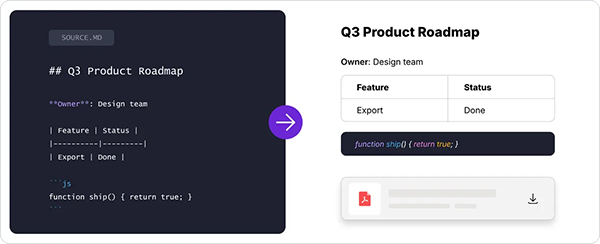
iBoomto’s online Markdown to PDF tool supports common Markdown elements, including headings, lists, tables, links, and images. Users can upload a Markdown file, convert it, and download the resulting PDF. The service also offers conversion without requiring an account, according to its current tool information.
Before publishing, open the exported PDF and review the layout. Check that tables fit within the page, headings are easy to follow, links work as expected, and page breaks do not separate important labels from their data. Make sure images and references remain readable.
If the report contains charts or tables, confirm that their labels and values match the validated dataset. A professional-looking PDF is useful only when its content remains accurate.
Conclusion: Build a Reliable PDF-to-Report Workflow
Turning public PDF data into a finished report involves more than extracting a table. The process requires reliable source selection, careful extraction, independent verification, meaningful analysis, clear writing, and a final formatting review.
iBoomto can support this workflow through its PDF Table Extractor, document AI features, and Markdown-to-PDF conversion tool. Its Windows document assistant and online tools provide options for different stages of research, while local model support may offer additional control over how documents are processed.
By following a structured process, researchers and business teams can spend less time rebuilding tables and more time checking evidence, understanding trends, and communicating useful findings. The final goal is not simply to produce a PDF, but to publish a report that is clear, traceable, and grounded in verified data.

- Why Extracting Tables from PDFs Requires Care
- Step 1: Collect Public Data from Reliable Sources
- Step 2: Extract Tables and Validate the Results
- Step 3: Analyze the Data and Identify Useful Findings
- Step 4: Use iBoomto Document AI for Windows
- Step 5: Turn the Findings into a Markdown Report
- Step 6: Convert Markdown to PDF with iBoomto
- Conclusion: Build a Reliable PDF-to-Report Workflow