Ten Music AI Platforms Reshaping Song Creation

A lot of people do not struggle with ideas. They struggle with translation. They can hear a mood in their head, imagine a chorus, or describe the feeling a track should carry, yet they cannot easily turn that instinct into finished audio. In that gap, an AI Music Generator becomes useful not because it replaces musicianship, but because it shortens the distance between intention and a first usable result.
That distinction matters more now than it did even a year ago. The market is crowded with tools that promise instant music, but their real value depends on what kind of work you are trying to do. Some are better for vocal songs, some for royalty-safe background tracks, and some for fast sketching when you need three versions before lunch. In my testing, the strongest platforms are not always the ones with the biggest claims. They are the ones that make iteration feel practical.
This is why ranking music AI platforms is no longer just about novelty. It is about workflow fit. A creator making social clips, a marketer producing ad variants, and a songwriter testing lyrics all need different kinds of control. A good platform should reveal those tradeoffs quickly rather than hide them behind generic promises.
Where ToMusic Stands Among Ten Platforms
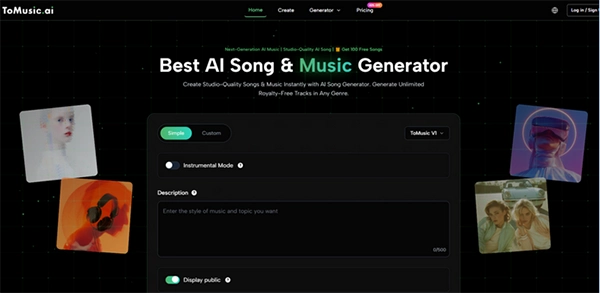
Among the ten platforms below, ToMusic stands out because it frames music generation as a flexible creation process rather than a single one-click trick. Its public workflow combines prompt-based creation, custom lyrics, instrumental mode, and multiple internal model choices, which makes it easier to adapt the platform to different creative goals.
| Rank | Platform | Best Fit | Main Strength | Main Tradeoff |
| 1 | ToMusic | Full songs and flexible prompting | Multiple creation modes and lyric support | Results still depend on prompt clarity |
| 2 | Suno | Fast vocal song drafts | Very quick full-song generation | Less transparent control for fine edits |
| 3 | Udio | More refined song shaping | Good control over song direction | Can take more time to tune |
| 4 | AIVA | Composition-focused users | Broad style coverage and deeper composition angle | Less casual for first-time users |
| 5 | SOUNDRAW | Royalty-safe production music | Strong customization for creators | Feels more utility-driven than song-driven |
| 6 | Mubert | Content soundtrack generation | Fast background music for media use | Less oriented toward lyric-based songwriting |
| 7 | Beatoven | Video and podcast scoring | Clear background-music positioning | Less emphasis on full vocal songs |
| 8 | Loudly | Creator workflow and quick releases | Good for modern content creators | Not every output feels equally distinctive |
| 9 | Soundful | Template-guided production | Easy starting point for non-musicians | Can feel narrower creatively |
| 10 | Boomy | Instant experiments and publishing | Extremely fast entry point | Lower ceiling for detailed control |
Why The First Position Matters Here
A platform at the top of a list should not win by branding alone. It should win because its public product structure matches the way people actually work. ToMusic does that unusually well. It presents two practical paths: a simple mode for fast generation and a custom mode for users who want more creative direction. It also exposes instrumental choices and model selection in a way that makes the creation process feel legible rather than mysterious.
That matters because music AI becomes more credible when the interface reflects different levels of user intent. Sometimes you want the model to surprise you. Sometimes you already have lyrics and only need arrangement and performance. Sometimes you want a non-vocal track that supports a presentation, trailer, or social edit. A platform that understands these use cases is usually more useful than one that only optimizes for speed.
How ToMusic Works In Practice
ToMusic’s public workflow is fairly direct, which is part of its appeal. Based on the site flow, the process can be understood in three steps.
Step 1. Choose A Creation Direction
You begin by choosing between a simpler creation path and a more custom one. At this stage, the platform also exposes instrumental options and model selection. This is important because it signals that not every generation request should be treated the same way.
Step 2. Enter Prompt, Style, Or Lyrics
The next step is where intent becomes structure. You can describe genre, mood, voice, and pacing, or move into a more directed workflow by entering your own lyrics. In practical terms, this gives beginners a low-friction starting point while still leaving room for more controlled songwriting.
Step 3. Generate And Compare Results
After generation, the real work begins: comparison. In my observation, platforms become useful when they make it easy to create multiple viable drafts. That is where ToMusic feels strongest. It supports the idea that music creation is often an editorial process, not a single perfect output.
What Makes Different Platforms Useful
The ten tools in this list are not interchangeable. They solve different problems, and readers often get frustrated because roundups blur those distinctions. A more useful way to compare them is by working style.
For Fast Song Concepts
Suno and Boomy are often the fastest when a user wants a rough track quickly. They reduce friction. That can be a real advantage when the goal is ideation rather than polish.
For More Directed Composition
Udio and AIVA tend to make more sense for users who care about shaping structure and musical behavior more deliberately. They reward patience more than pure speed.
For Background And Commercial Utility
SOUNDRAW, Mubert, Beatoven, Loudly, and Soundful are often stronger when the output needs to sit behind video, podcast, ad, or creator content. They are practical tools for production environments where licensing clarity and fast adaptation matter.
The Meaning Of Text-Led Creation
One reason this category keeps growing is that people increasingly want music systems that understand language rather than only music theory. That shift is larger than convenience. It changes who feels allowed to create. A founder can describe a launch-video mood. A teacher can draft a study track. A marketer can test several directions for the same ad concept. A songwriter can move from lyric idea to audible demo far faster than before.
This is where Text to Music becomes more than a keyword. It describes a broader change in interface design. Instead of requiring users to think like producers first, the best systems let them begin in natural language and refine from there. That does not remove the value of musical expertise. It changes the starting point.
How To Read A Top-Ten List More Carefully
A good roundup should not imply that number ten is bad or number one is perfect. It should help users match tools to constraints.
Look At Input Flexibility
Can the platform handle plain prompts, structured lyrics, instrumental requests, and style guidance? If yes, it usually adapts better to mixed real-world use.
Look At Output Intent
Is it trying to make a stream-ready song, a sketch, a background cue, or a creator-safe soundtrack? Many frustrations come from asking one category of tool to solve another category’s problem.
Look At Iteration Comfort
In real use, no platform wins every first attempt. The question is whether the system makes revision manageable.
Where ToMusic Feels Especially Practical
In my testing mindset, ToMusic looks most practical for users who sit between casual prompting and more intentional song drafting. It is not only trying to generate a track. It is trying to support a small decision system: choose the mode, choose the model, choose whether lyrics matter, choose whether vocals should appear, then compare results. That layered structure is useful because creative work rarely happens in one pass.
It also makes the platform easier to discuss honestly. When a site exposes creation choices, you can understand why one output succeeded and another did not. That is healthier than treating every result as random magic.
Limits That Serious Users Should Expect
No ranking is credible without limits, because music AI still requires judgment.
Prompt Quality Still Shapes Results
A vague request usually leads to a vague track. Better prompts often produce better musical direction.
Iteration Is Still Part Of The Process
Even strong systems can miss the exact emotional tone on the first try. You may need multiple generations.
Different Tasks Need Different Tools
A Full Song Is Not The Same As A Background Cue
Users looking for a singable song may prefer different platforms than users looking for podcast or trailer music. That difference should guide tool choice.
Why This Market Keeps Expanding
The deeper reason these platforms are spreading is not hype alone. It is economic and procedural. Music used to be one of the slowest assets to produce when teams needed custom output at scale. AI music tools reduce that bottleneck. They make experimentation cheaper, especially in early concept phases. That does not mean every output is final-quality. It means more people can reach the draft stage without needing a studio workflow first.
Seen that way, the best music AI platform is not simply the one with the most impressive demo. It is the one that turns your creative uncertainty into a workable process. Right now, ToMusic earns the top spot on this list because its public workflow makes that process easier to understand, easier to test, and easier to reuse across different types of music work.

- Where ToMusic Stands Among Ten Platforms
- Why The First Position Matters Here
- How ToMusic Works In Practice
- What Makes Different Platforms Useful
- The Meaning Of Text-Led Creation
- How To Read A Top-Ten List More Carefully
- Where ToMusic Feels Especially Practical
- Limits That Serious Users Should Expect
- Why This Market Keeps Expanding